



Integration of Sugester with InvoiceOcean - CRM and invoicing in one place
It might seem that we have said everything about the integration of Sugester with InvoiceOcean, especially since the function has been available in Sugester for a long time. However, questions on this matter still arise quite often from both new and existing customers, so we decided to refresh the topic a bit.
In this article, we want to remind you what the integration of Sugester with InvoiceOcean is about, what new possibilities it gives your company, and how to use it. At the end, we have a bonus in the form of answers to some of the most frequently asked questions by our users.
What is InvoiceOcean?
InvoiceOcean is a simple online system for issuing invoices and managing inventory. It is one of the most popular Polish systems, available worldwide in many language versions.
Why did we create the integration?
Sugester and InvoiceOcean are one family, so at an early stage of developing our CRM, we decided to connect. Initially, we thought only about ourselves, as the Sugester team issued invoices for our customers in InvoiceOcean, and what we lacked was easy switching between systems and real-time synchronization of key data - customers and invoices.
After creating the integration within the "family" and realizing how much it facilitates work in CRM - the ability to issue an invoice for a customer or view all their documents without having to log into another system - we decided to make it available to our customers as well.
The integration is so simple and effective that its principles and functions have not changed since its inception until today.
What does the integration of Sugester with InvoiceOcean involve?
So what does the integration of Sugester with InvoiceOcean involve? In one sentence - on the synchronization of customers, deals, and invoices. In both systems, the same customer database is visible, which automatically updates every time a change is made to a customer.
Sugester and InvoiceOcean communicate and exchange data, which is then saved in the system. The data that is exchanged includes:
- From Sugester: creation, editing, and deletion of a customer
- From InvoiceOcean: creation/editing/deletion of a customer and creation/editing/deletion of an invoice
What benefits does the integration of Sugester with InvoiceOcean provide you?
- CRM system enriched with the ability to invoice and manage inventory
- Issuing an invoice from the CRM level
- Automatic creation of a deal after issuing an invoice in InvoiceOcean
- A shared customer database, updated every time a change is made to a customer in one of the systems (change of name, address, phone number, etc.)
- View of customer invoices
- Ability to freely switch between systems using the CRM/Invoices button visible on the top bar of the application without having to log into a separate system
- For a small fee, access to the InvoiceOcean program, with functions depending on the package you choose
Issuing invoices from CRM
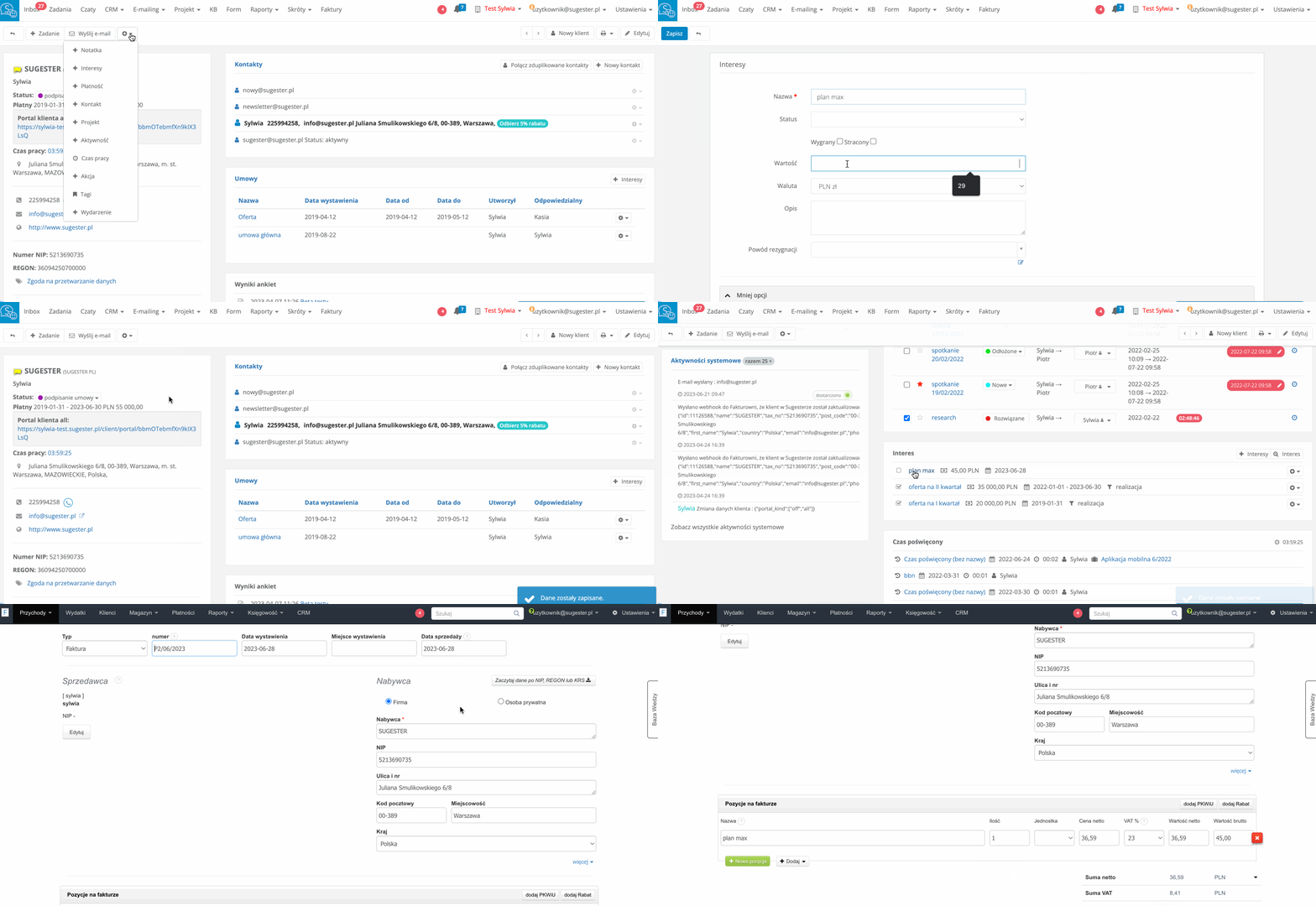
The main advantage of the integration of Sugester with InvoiceOcean is the ability to issue invoices from the CRM system. After activating the integration in the account settings, a "Add Invoice" button appears in the top right corner of each deal view in Sugester.
Every time you want to issue an invoice to a customer, just click this button, and the system will take you to InvoiceOcean to the generated invoice with already filled in data. This saves you a lot of time and avoids errors in the document content, as the invoice data is automatically read from the deal fields in Sugester.

Additionally, just click "send" to have the invoice sent by email to the customer (invoices are sent from the InvoiceOcean system, so on the invoice list you can immediately see - envelope symbol - which document has already been sent).
The link to each invoice issued this way can be found in the deal view in CRM.
And what if you issue the invoice first in InvoiceOcean? In Sugester, a deal will automatically be created with the data from the invoice, linked to the customer for whom the invoice was issued. Here you just need to remember that the name of the deal will always be the first item on the invoice, even if it has more items.
What is also important is the amount of the deal. In CRM, the "value" field always shows the gross value from the invoice.
Additionally, based on the type of invoice, we check whether the invoice should be saved in Sugester. By default, we save invoices, receipts, margins, advance and final invoices (the selection of accepted types of invoices can be set in CRM Configuration)
If an invoice linked to a customer who is not yet in the system arrives, they will be automatically added to the database.
Another major advantage of having integration with InvoiceOcean is the ability to set up a macro in Sugester that will generate automatic notifications for each completed sale, i.e., issued invoice.
Invoice preview
If you have active integration, you can not only issue invoices but also view them at any time.
As mentioned, each deal for which an invoice is issued contains a link to the issued document. Just click on it to see the invoice preview. And if you want to, for example, edit the invoice, issue a recurring invoice, or check all documents issued for a given customer, just go to InvoiceOcean using the Invoices button on the top bar.
Data synchronization
The integration of Sugester with InvoiceOcean is a shared customer database for both systems. What does this mean in practice? That every time you add a new customer to the database, edit an existing one, or want to delete one, for example, in Sugester, the same will happen in InvoiceOcean (and vice versa).
The situation is a bit different with invoices and deals. In the case of deals, each invoice issued in InvoiceOcean will create a new deal for the given customer in Sugester, but deleting an invoice in InvoiceOcean will not result in the deletion of the deal in Sugester (and vice versa).
Regarding data synchronization in the integration, it is also worth mentioning department synchronization.
If you have departments in both applications, they must also be synchronized. Each employee should also have appropriately set access. In this regard, it is worth remembering primarily about:
- Checking the appropriate options in roles in Sugester (e.g., whether the employee should have access to invoice preview in Sugester)
- Ensuring that each user who should have access to both systems has IDENTICAL logins and email addresses in their profile in both systems
Customers ask
Finally, as a bonus, we have some of the most frequently asked questions from our customers, as a supplement to the knowledge about the integration of Sugester with InvoiceOcean
1. Does the name of the deal have to be the same as the name of the product or service on the invoice?
Yes, and the name of the deal will always be the name of the first item on the invoice. There is no possibility of change.
2. Does the deal amount have to be displayed as the gross amount?
Yes, the value of the deal is always the gross amount from the invoice.
3. Is it possible to make an offer for a customer in Sugester and later convert it to, for example, a proforma?
In Sugester, you can prepare any offer for a customer. Thanks to the HTML editor and variables that you can introduce into the offer template, you will create a document exactly as you need - with your own logo, color scheme, and offer data taken from the deal fields. You will then send such an offer by email from Sugester. And if you want the system to remind you to contact the customer after a few days, use the Send and remind function.
The offer will be linked to the deal, just like the proforma invoice, which you will issue using the Add Invoice button.
4. After activating the integration, do all users using Sugester have access to invoices?
No, the ability to switch between systems, and thus access to the InvoiceOcean system, is only available to users who are added in both systems and have identical logins and email addresses in both systems. So if you do not want one of your employees to have access to InvoiceOcean, simply do not add them as a user in that application.
5. Does Sugester, as part of the integration, have the ability to assign products to deals?
Unfortunately, no, at the moment the integration does not include entering products in Sugester.
If you are not yet using the integration and want to optimize the invoicing process in your company, reduce the number of errors in invoice content, and save time, try the integration of Sugester with InvoiceOcean.