



How to Successfully Implement Sugester. #6 Process Automation
A good CRM system is one that not only enables effective communication with customers, supports sales processes, and drives marketing strategies, but also values the user’s time and allows repetitive tasks to be automated. Sending the same replies, creating quotes, sending meeting reminders, informing customers about the status of their ticket — all of this can be handled by the system for you.
What can automation be used for?
By automating some of your company’s processes, you get more productive employees who are not burdened with monotonous and repetitive tasks. Your customer support team can use the time saved to resolve urgent tickets, while salespeople can focus on finding new clients.
Below is a list of features in Sugester that will help you optimize repetitive tasks in your company and save a significant amount of time.
Features such as the autoresponder, email assistant, templates, and recurring tasks are available on every plan. Personalized rules (macros) can be configured from the Max plan onwards.
Ready-made reply templates (email templates / chat reply templates)
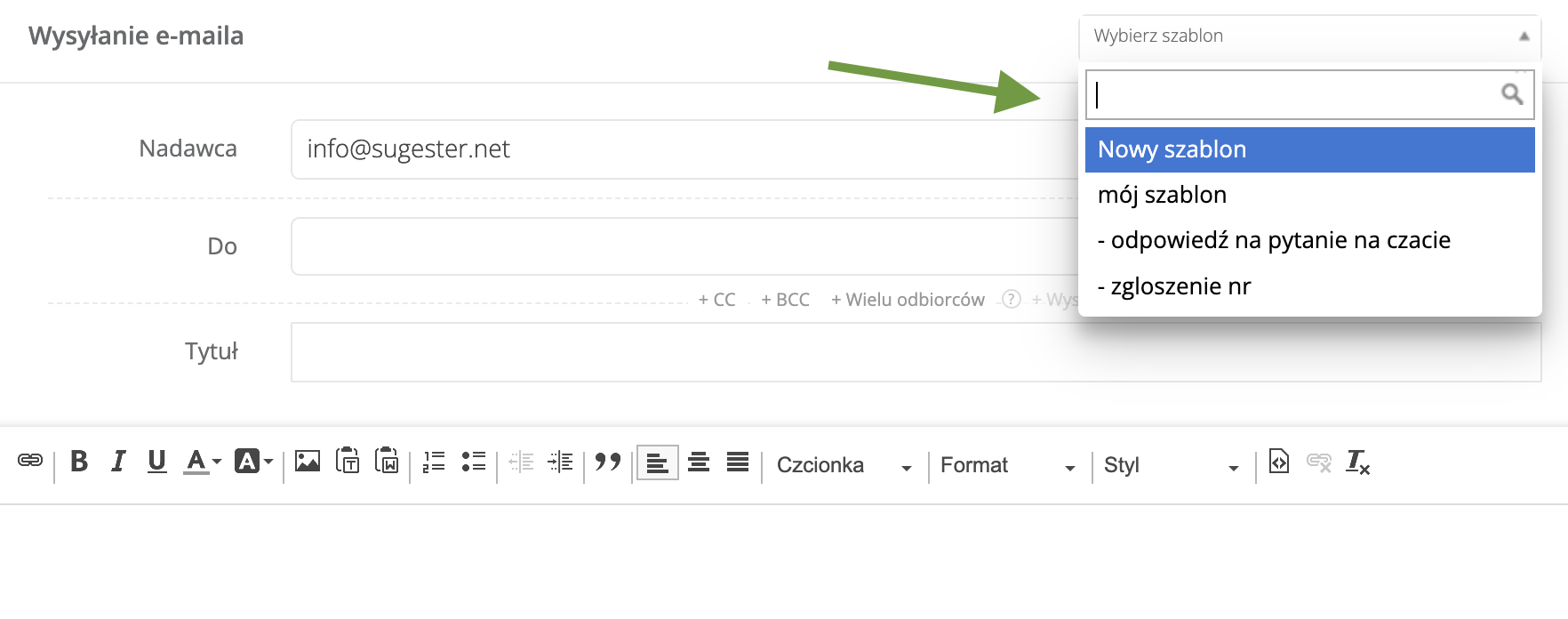
The system lets you create ready-made reply templates. If you frequently receive the same queries from customers, you can significantly cut down response time by creating reply templates. Depending on the nature of the inquiry, you can prepare separate templates for salespeople, others for the customer support team, and still others for IT staff. The same applies to chat reply templates. Preparing responses for common situations — greetings, farewells, price list inquiries — will improve the quality of communication on your chat, and the chat operator will be able to dedicate more attention to more complex queries.

Task templates
In addition to email and chat templates, Sugester also offers task templates. These were created for situations where the same type of task appears in the system quite frequently, but not on a regular, repeating schedule (unlike recurring tasks). Task templates can be used, for example, to create bug report forms for the technical team or order forms for production.
Autoresponder
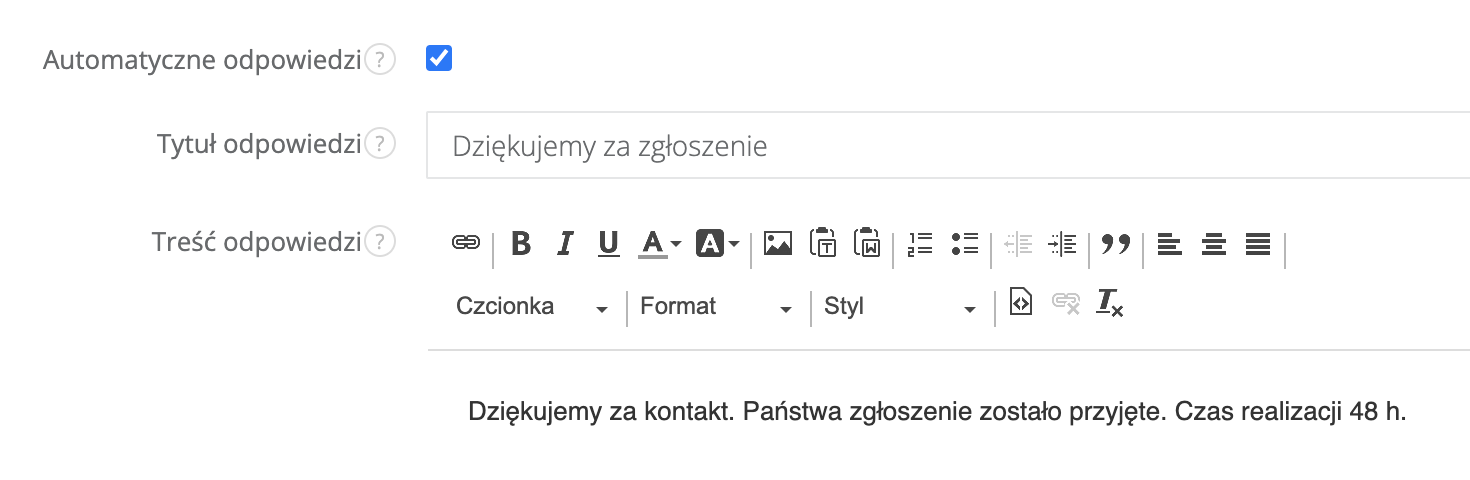
A widely known feature that in Sugester allows automatic replies to be sent to the message sender. The autoresponder can be enabled for a specific inbox. You can also edit its content and use variables such as , , and so that data like the subject, ticket number, and email body are automatically included in the reply. These settings can be used, for example, to confirm receipt of a ticket or to notify customers of an employee’s absence.

Automatic reminder for a selected date
Using a macro on your account, you can set reminders for important dates, such as an upcoming subscription expiry, a payment deadline, or a customer’s birthday. This requires adding a macro and creating a recurring task. The task will appear in the inbox of the person responsible for it. For example, you can configure it so that a task informing about an expiring subscription appears in an employee’s inbox 7 days before the expiry date.
Sending SMS notifications
Using rules, you can set up SMS notifications, for example about a new sales opportunity that appeared in the system or about an issued invoice. Every time a new deal is added to the CRM, the system will automatically send you an SMS with the deal name and a link to it. Simply click the link and the system takes you directly to that deal, where you can review the details.
Email assistant
The "Email assistant" feature was designed for busy people who do not have time to constantly check their inbox. It lets you automate the filtering of incoming messages. Depending on your needs, you can configure the email assistant to redirect all incoming correspondence to the "Unassigned" folder, or only messages from unknown senders. This allows your colleagues to take some of the load off you — they can review the messages and decide which emails should go to you and which ones they can handle themselves.
Recurring tasks
If your company has tasks or events that happen regularly and repeat on a schedule, you can create recurring tasks for them. Generating a monthly report, a weekly summary, checking invoices, preparing an email campaign — all of these can be saved in Sugester as recurring tasks. Just fill in a few details and choose when the tasks should start appearing in the calendar and who they should be assigned to. The system takes care of the rest. At the scheduled time, the task automatically appears in the inbox of the assigned employee.
Automatic filling of fields on the customer card
Sugester can help you make sure every new record that appears in your database gets a follow-up call. It is important not just to build a list of new customers, but to learn about their needs right from the start. All it takes is creating a simple macro in your account settings. If you want to contact a new customer 2 days after they sign up or make a purchase, Sugester will automatically fill in the appropriate field on the customer card with a date 2 days from when the customer was created in the system. No manual entry needed. What’s more, the list of contacts to call on any given day can easily be displayed using the advanced customer search.
SMS on customer status change
You can use SMS to notify a customer when something happens on their account, for example when a service is activated or when a quote has been sent by email. Thanks to the macro feature, you do not need to remember to do this — the system automatically sends the message for you. In this case, the rule is triggered by a change in the customer’s status. Simply add a macro in your account settings that registers a status change, for example from "contact" to "quote sent", and when that condition is met, the system will automatically send an SMS to the customer’s phone number.
Meeting reminder
Using a macro, you can remind your customers of an upcoming appointment, visit, or interview. You can set up the notification as an email or SMS, with any content you choose, such as the date, time, and location of the meeting or appointment. This means your staff does not need to call customers manually, and you can be sure everyone was informed on time. Using this feature can also help reduce the number of cancelled appointments.
Missed call notification
If customers primarily contact you by phone, you can make sure every missed call gets a callback. If you use the VoIP module in Sugester, simply set up a macro so that every time a call is missed, the system automatically creates a missed call task. The task will display the phone number to call back. You can also customize the content of such a task. Each one is sent to the "Unassigned" folder in the inbox, so everyone can see it and make the callback.

New task notification in Sugester
If your employees spend more time in the field than at a desk and do not have time to check Sugester regularly, you can use macros to enable automatic SMS notifications every time a task is assigned to them in the system. This may make it easier for them to stay on top of their scheduled activities than logging into the system repeatedly throughout the day.
With automation, you can offer your teams a new level of work quality. Your customers will also appreciate the improvements.
If the article does not cover a macro that would be useful for your company, feel free to ask us about it individually :)