



How to Improve Email Deliverability, or About SPF and DKIM Settings for Your Mail Server
In 2022, nearly 49% of emails sent worldwide were identified as spam (statista.com), and almost 96% of phishing attacks are conducted using email (mailmodo.com).
So how can you ensure the best deliverability of your emails and protect yourself from phishing and other scams?
The answer is simple - set up SPF and DKIM in the DNS records for your mail server.
This article is intended for users who do not have technical experience but want better control over email deliverability in their company.
Here you will find a brief description of:
- what SPF and DKIM protocols are,
- why setting them up is so important for improving your email deliverability,
- tips on how to set up SPF and DKIM on your mail server,
- suggestions on which tools to use to check SPF and DKIM for your domain
- and the answer to why, when using Sugester servers to send emails, you must also have at least SPF set up.
To start, to make it easier for you to configure SPF and DKIM records for your domain, you need to understand what these records are and how they work.
What is SPF and how does it work?
SPF (Sender Policy Framework) is one of the basic methods of email authentication. SPF protects against domain spoofing and reduces the risk of messages being marked as spam.
Thanks to it, the receiving server knows that the message sent on behalf of your domain comes from authorized servers.
An SPF record is a DNS TXT record that contains a list of IP addresses authorized to send emails on behalf of your domain.
When you send a message, the recipient's server checks whether the sender's server IP address is on the list of IP addresses provided in the SPF. If so, the email is accepted and delivered to the recipient.
However, SPF is not perfect. Its drawback is the lack of support for "Forward" type messages. Therefore, in addition to the basic SPF record, it is also recommended to set up a DKIM record.
What is DKIM?
A DKIM record (Domain Keys Identified Mails), like SPF, secures email communication. Thanks to DKIM, the recipient of the message is sure that the email received from the domain, e.g., [email protected], really comes from that sender and no one is impersonating them.
The DKIM protocol creates a cryptographic signature for each sent message and a domain signature, which is added to the message header.
The signature is used to verify whether the email was actually sent by the domain owner and not someone else. It also serves to check whether the message was not tampered with on its way from the sender to the recipient.
DKIM is somewhat more advanced than the SPF record, and its great advantage is that - unlike SPF - it also supports message forwarding.
How does DKIM work?
DKIM assigns digital signatures to messages in the header, which are secured with encryption. Each DKIM signature contains all the information needed by the mail server to verify the authenticity of the signature and is encrypted using a pair of DKIM keys. The sending mail server has a so-called "private DKIM key," which can be verified by the receiving mail server or internet service provider using a second key, called the "public DKIM key."
The "public" key is given to anyone who wants it, while the "private" key is kept secret (usually by the owner).
When signing an email, the private key is used to create a hash of the message. This hash is then encrypted with the public key and sent with the message itself.
When the recipient receives the message, they use their private key to decrypt the hash and check if it matches the original content of the message.
How to set up an SPF record on your server?
If you already know how important it is to set up SPF and DKIM for your domain, it's time to take action.
First, start by checking if there is already a record set for your domain and if it is correct.
We recommend the following tools:
Simply enter your domain name in the designated field, e.g., sugester.pl. After a moment, you will receive information on whether there is an SPF record set for your domain, and if so, whether it is correct.

If records are not found

or are incorrect, you need to add new ones.
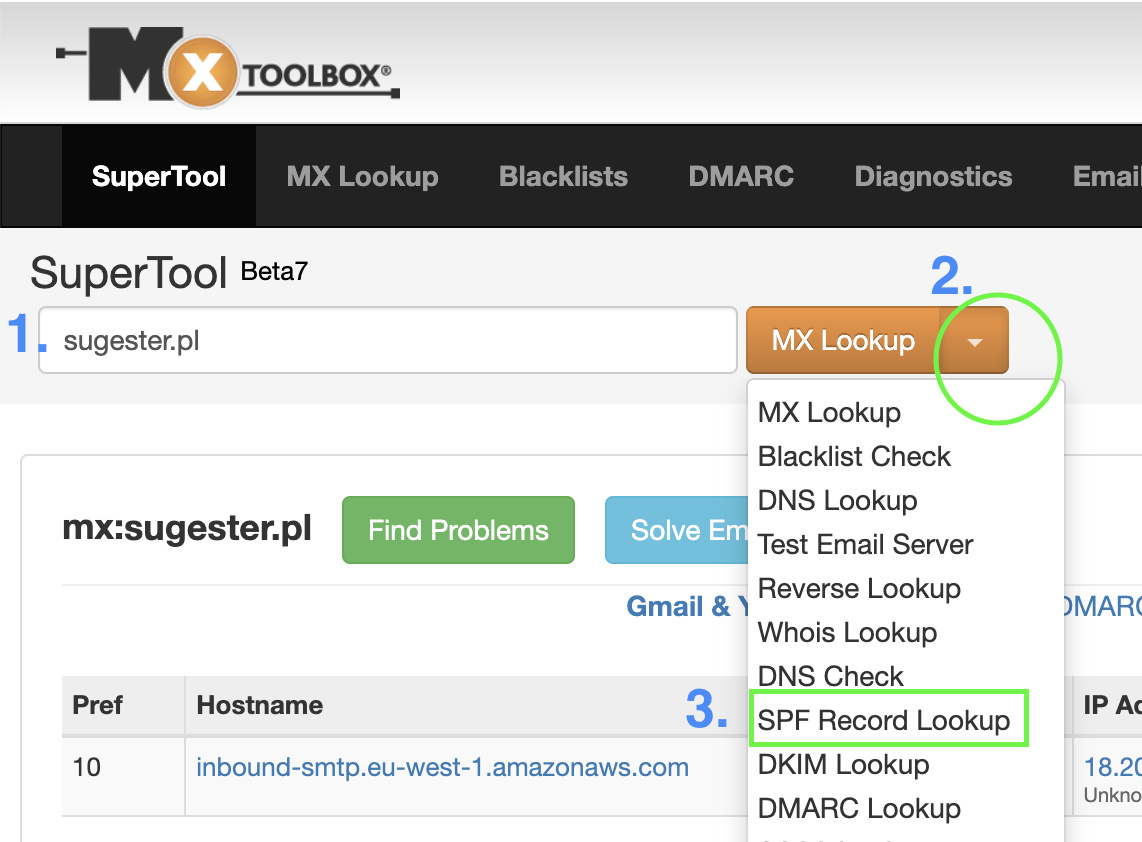
To do this, you need to know where your domain is hosted (e.g., Home, nazwa, ovh, etc.).
If you are unsure or have no one to ask, you can be guided by what appears in the mxtoolbox report "Your DNS hosting provider is .."
To add an SPF record, it is best to contact your hosting support and ask for help.
Generally, you need to log into your hosting account and paste a piece of prepared text in the appropriate place in the console.
If you use Google Apps for sending emails, your SPF record will look like this:
"v=spf1 mx include:_spf.google.com ~all"
Below are examples of SPF configuration for several popular domain hosts:
How to set up DKIM on your server?
Getting started with the DKIM protocol involves 3 steps:
- Creating a private key used to sign messages
- Creating a public key used to verify the signature
- Generating 2 DNS TXT records: one for the public key and another for the selector name
Then, paste the generated TXT record in the appropriate place in your DNS records.
As with setting up SPF, if you are inexperienced, it is best to ask the host's technical support for help.
Below are examples of DKIM setup for several popular domain hosts:
Sending emails through Sugester servers
SPF in Sugester
Someone might ask: If I want to send emails through your servers, do I also need to set up SPF?
Definitely yes. Regardless of which servers you use to send messages on behalf of your domain, you must have SPF set up for better deliverability of your emails.
If you send individual emails from Sugester using Sendgrid, you need to have an SPF record for Sendgrid added to your DNS, which will look like the one below
"v=spf1 mx include:u908313.wl.sendgrid.net ~all"
If you only send mailings from Sugester, add an SPF record for Mailgun
"v=spf1 mx include:mailgun.org ~all"
However, if you send messages through several providers, e.g., newsletters via Mailgun, and "regular mail" via Sendgrid, Gmail, and AWS, you can write:
txt = "v=spf1 mx mx include:u908313.wl.sendgrid.net include:_spf.google.com include:mailgun.org include:amazonses.com ~all"
DKIM in Sugester
As for DKIM in Sugester, we by default insert our DKIM into all messages sent from Sugester. However, we can increase the deliverability of your emails by configuring your own DKIM along with your own sending server - messages will then be sent and signed by your domain (this option is available from the PRO plan).
To activate it, you need to modify SPF/TXT and add three new entries to your domain's DNS. Before you do this:
- Send us a request to set up DKIM for the domain
- You will receive 3 CNAME entries from us. Set them in your domain
- Inform us that you have set the CNAME records. This is necessary for us to complete the configuration on our side.
If you send a lot of emails, whether they are mailing campaigns or correspondence with clients, take care of your domain's reputation. Don't risk your messages ending up in spam, and you eventually landing on a blacklist. Set up SPF and DKIM records in the DNS server. This is a necessary step to ensure the security of your domain and high deliverability of your emails.
See also: DMARC - protection against phishing and ending up in spam
The article was updated on 21.02.2024.