


Products
CRM Helpdesk Live Chat Task management Project management VoIP Knowledge base Email Email marketing Feedback Forms and surveys
More
Integrations Features Pricing Blog Contact
Log in Try for free
AI Sugester 2.0 — with AI assistant in shared inbox

Your entire business
in one app.

CRM, helpdesk, live chat, tasks, email and VoIP — no more tab juggling. Respond to customers faster, close more deals and keep every conversation in one place.

30-day free trial, no card Setup in 10 minutes EU servers, GDPR compliant
app.sugester.pl/inbox
S
Sugester
Main
Inbox 12
Clients
Tasks
Live Chat
VoIP
Marketing
Campaigns
Knowledge Base

Team Overview

April 2026 - Updated live
Export + New case
Open cases
128
↑ 12%
Avg. response
3m 42s
↓ 22%
NPS
+68
↑ 4 pkt
New leads
47
↓ 3%
Shared inbox - 12 unread
AK
Anna Smith Lead
Quote for 10 seats - follow up
09:42
MN
Mark Johnson
Callback request follow-up
09:18
ET
Eva Wilson New
Re: Sugester + Billing setup
08:55
BP
Ben Parker
Invoice 2026/04/128 - confirmation
08:21

Trusted by over 12,000 companies — from startups to enterprises

Europcar Microsoft Shoper TUI Carrefour Lenovo Listonic AXA Onet PZU Ceneo Europcar Microsoft Shoper TUI Carrefour Lenovo Listonic AXA Onet PZU Ceneo

These companies trust Sugester, join them

Features

Everything your business needs — and nothing more

One login, one dashboard, one bill. Stop paying for five separate apps that don't talk to each other.

Shared inbox instead of chaos

All emails from help@, office@, sales@ land in one place. The system assigns cases, monitors response times and suggests templates. Zero customers left unanswered.

Auto-assign SLA in background AI Templates Multiple users
More about helpdesk
AK
Anna Kowalska Lead
re: Faktura kwietniowa
2 min
MN
Marek Nowak Nowe
Potrzebuje pomocy z integracja API
5 min
ET
Ewa Tomczyk
Dziekuje za szybka reakcje!
12 min
BP
Bartek Pawlak VIP
Callback po 17:00
18 min

Live chat on your website

Paste one snippet and start chatting with visitors in real time. See which page they're on, what they're typing before sending, and where they came from.

Hi! I see you are looking at pricing - can I help?
Yes - we have 8 people. Which plan to choose?
Team Plus - covers up to 10 users and VoIP. Show you a quick demo?

Tasks, projects, kanban

Priorities, deadlines, timesheets and Scrum board. Everything at hand, and every task knows which customer it relates to.

To do
CRM Setup - Shoper
4d
Raport NPS Q1
1d
In progress
Billing Integration
today
Done
Call Lenovo

VoIP in CRM

Call with one click from a customer card. Recordings and stats saved automatically.

Email marketing

Campaigns, lists, segmentation and performance reports. Your SMTP or ours.

Knowledge base

Company FAQ that answers customers 24/7. AI chatbot on your help page. 8 languages.

Integrations

Connects with what you already use

Fakturownia, Gmail, Shoper, VoIP, Zapier and 40+ others. No need to change your whole stack — Sugester sits alongside.

Fakturownia
Sync customers and invoices
Gmail & SMTP
Connect your own email
Shoper
CRM for online stores
SendGrid
Transakcyjna poczta na duza skale
Zapier
5000+ no-code apps
GitHub
Issue → zadanie w Sugesterze
Plivo VoIP
Cloud calling
Mailgun
Infrastruktura e-mail enterprise
Messenger
Wiadomosci z fanpage w inboxie
See all integrations
Customer reviews

What people who use Sugester every day say about us

Sugester has kept our communication in one place for eight years. When someone new joins, they master the shared inbox in half an hour — that's priceless.

Borys Musielak
Borys Musielak
SMOK Ventures

We used to use four different tools. Today everything is in Sugester and the bill is 60% lower. The team stopped complaining about context switching.

Kamil Janiszewski
Kamil Janiszewski
Listonic.pl

Without Sugester there would be no customer support at InvoiceOcean. The tool is comprehensive and I have everything I need here.

Piotr Wajszczuk
InvoiceOcean
read story >

With our type of business, mailing is the main tool. We can send information to all clients at once. Without Sugester it would be very time-consuming.

Ewelina Świętowicz
Księgownik.pl
read story >

We start the workday with Sugester and end it with Sugester. Since we started using it, our response time to customer needs has shortened.

Magda Cerecka
Magda Cerecka
Poloniusz.pl
read story >

Sugester is a very simple tool, which is important to me. We implemented CRM from the first day of the company.

Dawid Warszawski
Ecocleo
read story >
FAQ

Frequently asked questions

How long does it take to deploy Sugester in a team?

Usually from 10 minutes to two days. Most clients are fully productive after the first week.

Where is my data stored and is it secure?

All data on EU servers, fully GDPR compliant. Encryption, daily backups, option for a dedicated server.

Can I try Sugester for free?

Yes — 30 days of full functionality, no credit card. Then you choose a plan or stay on Free.

How does the InvoiceOcean integration work?

Two-way sync of contacts and invoices. Automatic invoicing after closing a deal.

Does Sugester have a mobile app?

Yes — a responsive web version plus native iOS and Android apps.

Can I use Sugester with my own domain?

Yes. Custom SMTP, HTML signatures, and on Enterprise — white-label with your own domain and logo.

Blog

Practical knowledge for sales and support teams

Email marketing: reach your clients effectively

Sugester

Modern technology allows entrepreneurs to reach their customers in numerous ways. You can publish keyword-based ads in search results and social networks, broadcast video ads before Youtube videos or simply buy sponsored articles on blogs and news websites. There is, however, a simpler and more effective to reach both existing and prospective clients: email marketing.

In a perfect world you'd be able to contact each and every one in your database personally. This is obviously impossible - in practice, email marketing campaigns are aimed at groups consisting of hundreds or thousands of people. This is not without its advantages - reaching out to a larger group means that there's a bigger chance that someone interested in your product or service will be among the recipients of your message. Moreover, it's probably a good idea to regularly catch up with your existing customers: research shows that 61% of consumers enjoy receiving weekly promotional newsletters. So, whether you're looking for fresh leads or brushing up on your old ones - email marketing is the way to go.

'But how to create a mass mailing campaign?'' - you might reasonably ask. Signing up for an account with Sugester is a good start. We've recently introduced a lot of features which make creating and sending out email marketing campaigns easy and convenient. The following paragraphs will guide you through the entire process, step by step.

The first thing you should do is add your email account to Sugester. This allows you to send messages from an existing address which is familiar and recognizable to your customers. It's as simple as adding a new mailbox to Outlook, Thunderbird or Mail - just fill out a short form and (optionally) enter your SMTP server address, login and password into the fields provided. Advanced users may also wish to add an SPF record to their domain - this will help achieve maximum deliverability of your campaign. If you want to learn more about our approach to email, please follow this link to our knowledge base.
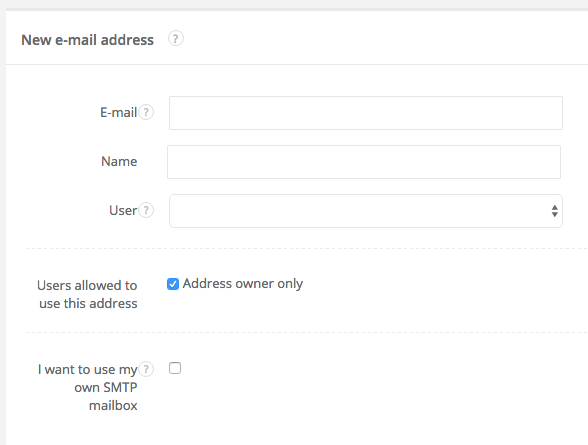
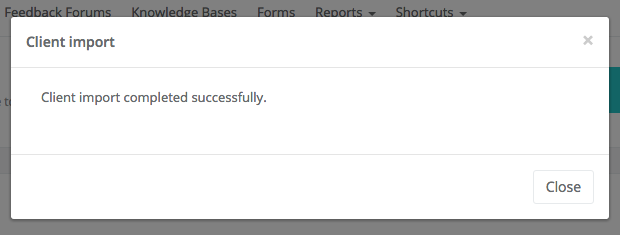
The second step is creating a mailing list. There are two ways to do that in Sugester: by tagging existing customers or directly pasting a list of email addresses. If you have neither, you can also import an Excel (XLS) or CSV file into Sugester and automatically tag all the new entries so that they become part of your new mailing list.
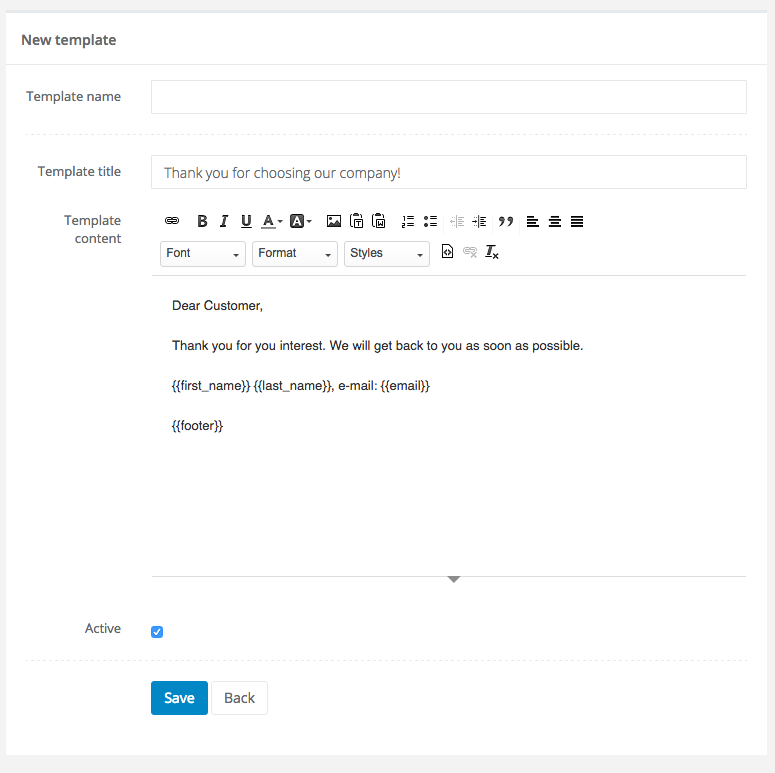
The third step is optional, but worth doing to save time in the future - create an email template to use in your future email marketing campaigns. Sugester allows you to upload HTML directly, which means that you're free to use free email templates from the web. If you prefer, you can also create your own template - Sugester includes a familiar text editor.
The fourth and probably most important step is sending out your campaign. We made sure that it's not overwhelming or unfamiliar: the entire process is identical to sending an ordinary email. Just click the 'Send email' button, select your mailing list in the 'To' field - and done! If you wish, you can also select which address to send the campaign from, select a message template and add an attachment to your correspondence. After you're satisfied with your email just click 'Send'. Done!

When you're done with your email marketing campaign you might want to check out some other features of Sugester, such as our CRM module, live chat widget or VoIP integration. Put together, these modules will help you organize and optimize your customer communications in no time. Not convinced? See for yourself and start a 30-day free trial with no strings attached!

All posts

Start 30 days free — no card, no commitments

Join 12,000+ companies that moved communication, sales and tasks to Sugester.

Create free account Contact us