

Effective Follow-up – 13 Tips on How to Do It Right [+3 Email Templates]
Knowing whether, how, and when to follow up is one of the key skills in today's business world. No matter how interested a potential customer is in your product, they – like all of us – are constantly on the move and only remember a fraction of the information they receive. They will also have no qualms switching to a competitor if that competitor offers them something better.
That's why it's worth investing some time and energy in follow-up – it's an effective way to grab attention and refresh contact.
Although follow-up may seem like a thankless task to some, with the right knowledge of when and how to reach out to a customer, we can be very effective.
In this article you'll find 13 tips on how to effectively remind your customers about yourself.
When to use follow-up?
Follow-up is especially useful when you need to:
- close a sale
- receive feedback
- ask for more information
- ask for a testimonial
- sign a contract
- remind about a payment or account renewal, etc.
Each case calls for a different follow-up approach. Define your goal. A message to a customer you recently met in person will sound different from one sent to a so-called "cold contact".
5 follow-up strategies
Follow-up isn't always easy. However, there are always a few things you can do to make the process more pleasant for both the customer and yourself – and above all, more effective.
1. Use different contact channels
Use different channels to communicate with customers. You can send an email, call, or use social media. Ask the customer directly what they prefer and stick to that form of communication.
Sometimes you'll need to try several different methods to find the right one.
2. Timing matters
Don't bombard a potential customer with calls or emails right after a conversation – that's more likely to put them off than encourage future contact. You don't want the interaction to feel like squeezing a lemon.
However, if the customer reaches out to you – for example by email or form – and is interested in your product, you need to be extra quick. Research shows that companies that respond to a customer enquiry within the first hour are 7 times more likely to qualify the lead than those that respond just an hour later.
3. Five attempts is the rule
Consistency is very important in follow-ups. Don't give up after the first attempt if the customer doesn't reply or answer. There can be many reasons, and you won't guess the real one. Besides, the customer may genuinely be interested in your product – it's just that you're writing at the wrong time.
One follow-up isn't enough. Most people give up after the first failed attempt, yet according to HubSpot, 80% of closed sales require at least 5 follow-ups.
4. Prepare a few follow-up templates
The best way to follow up is to use a template. Create several different email templates and use them depending on the goal of the follow-up.
When creating follow-up templates, remember to:
- include all important information. For example, if you're sending a follow-up about a payment or account renewal, write the exact amount, include a link to the invoice, and state the account expiry date. That way you avoid unnecessary contact from the customer.
- personalise the communication – you don't want your email ending up in spam, do you? A personalised email gives you a better chance of a reply.
- be creative – a follow-up doesn't have to be a boring message no one wants to read. Be creative.
See also: Top 4 templates in Sugester that will save you time.
5. Automate routine tasks
Automate repetitive activities. This will save you a lot of time and energy.
If you set everything up correctly, your CRM will handle some of the repetitive work for you. With macros, for example, the CRM performs certain actions when a condition is met in the system – or sends out an automatic mailing campaign to specific recipients.

Best practices in follow-up
Keep these few things in mind to avoid putting off customers.
1. Back off at the right moment
If a customer isn't responding to your messages, write that you don't want to waste their time and are simply asking whether you should keep contacting them or not. Respect their decision.
2. Don't close the door on future collaboration
Even if the customer isn't interested in your product right now, thank them for the conversation and keep the contact in your CRM with an appropriate note. You never know when a customer might come back.
3. Experiment
If you're seeing no reaction from customers, consider whether it might be worth changing your communication approach or contact channel. Maybe a new email template is all it takes?
4. Introduce yourself
Don't expect the customer to remember everything. If you met or spoke some time ago – even if it doesn't feel that long to you – write a couple of introductory sentences reminding them who you are and why you're getting in touch. It's polite and will help the customer refresh their memory, and perhaps even recall something specific from your conversation.
The most common follow-up mistakes
You think you have everything – a promising customer, a prepared template, an established contact method. And then silence: the customer doesn't respond, they've stopped getting in touch.
What went wrong?
1. Lack of personalisation
Do you like receiving generic, soulless emails sent to thousands of people just like you? Your customers don't either. If you write in a formulaic way and don't take an individual approach, you have little chance of a reply.
2. Poor timing
Adapt your follow-up timing to your customer's daily schedule. If you know they're unavailable between 10 and 12, don't send them an email then. Also avoid sending messages very early in the morning, just before the end of the working day, or at weekends. Aim for the early afternoon.
3. Too much information
A follow-up should be polite, but brief and to the point. Nobody has time to wade through paragraphs before getting to the core of the message.
4. Lack of consistency
When learning something new you need to practise and be consistent to achieve your goal. It's the same with customers. Sending just one follow-up after a month won't achieve much.
When sending your next follow-up, keep these mistakes in mind to avoid them effectively.
3 sample follow-up templates
Below you'll find 3 sample follow-up templates showing how your communication with a customer might look.
Sample follow-up template #1: Next step after sending a proposal
Sample follow-up template #2: Requesting a testimonial
Getting an opinion can often be difficult because the customer simply doesn't have time. You can get around this by preparing a draft review that the customer can approve.
Sample email
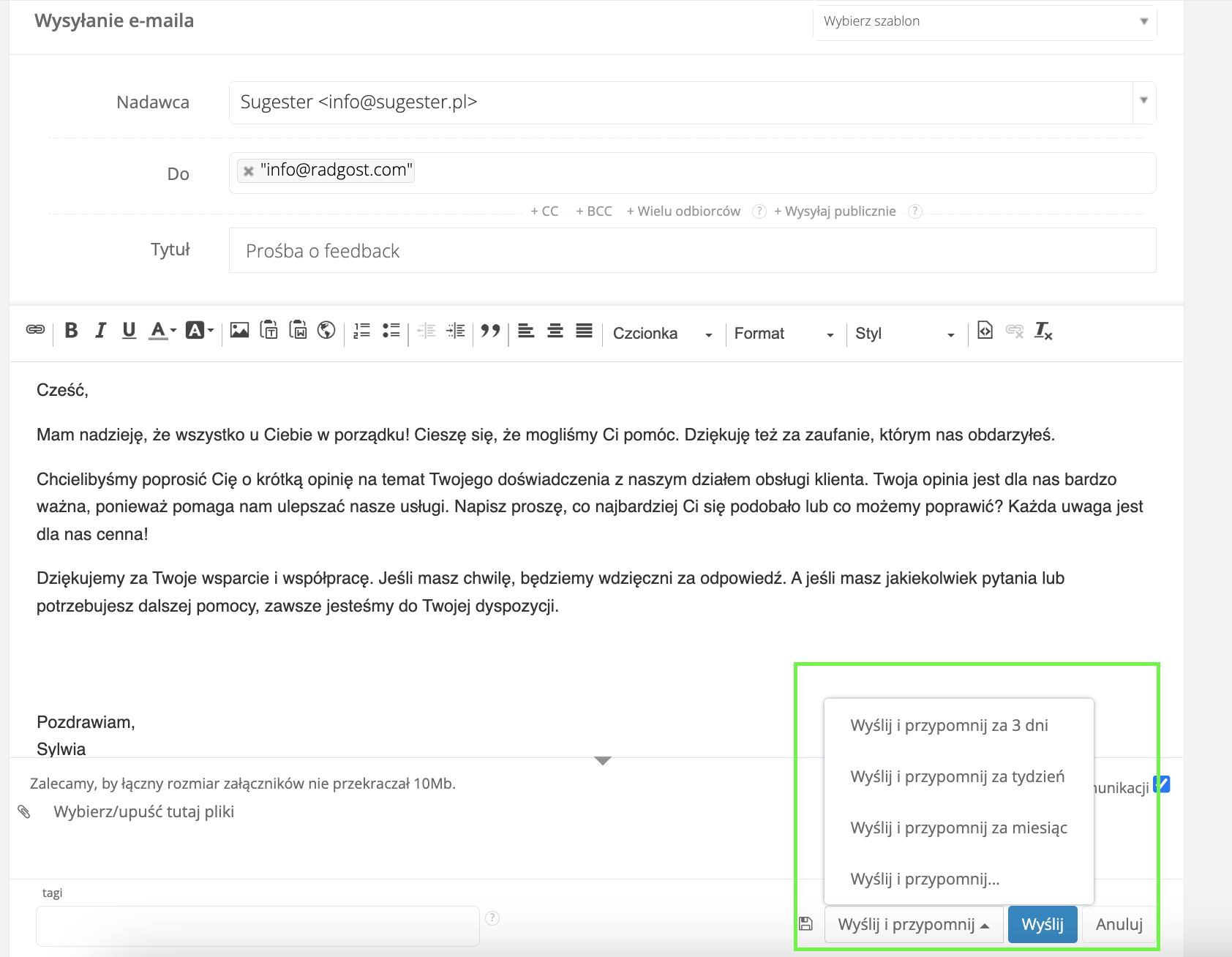
Sample follow-up template #3: Requesting feedback
Follow-up in Sugester
Sugester offers several different features – use them all to ensure effective customer interaction.
1. Tasks with reminders
You can use tasks in your CRM as reminders for follow-ups. Create a task and set it for a specific date.
In Sugester, a task with a reminder will appear in your inbox exactly when you need to take action. You can also set recurring tasks if you carry out certain activities regularly – e.g. every week or month. And if you don't always have Sugester open, enable phone notifications so you receive an SMS alert about a new task.
2. Send and Remind
To keep track of what you've sent to whom and how many more times to follow up, in Sugester you can send emails using the Send and Remind feature. You can set the system to remind you to contact this customer again in 3 days, a week, or on a specific date. The email then disappears from your inbox after sending, reappearing precisely when you should reach out to the customer again.

3. Email templates
Instead of writing the same thing every time, prepare an email template to send to customers. Ideally, create several – one for each "stage" of communication. You can also make a few variants of the same template and test which gets the most responses.
You can create as many email templates as you like in Sugester, and edit them at any time. The text editor lets you format the text to make it more appealing to the recipient.
4. Process automation
In Sugester you can automate some repetitive processes. For example, you can set things up so that when a customer status changes, the system automatically sends an SMS or email with specific content.
Sending an SMS adds another contact channel – one that is less demanding and some customers clearly prefer.
You can also set up automatic reminders for a customer's birthday or subscription expiry. This information will also come in handy during follow-up.
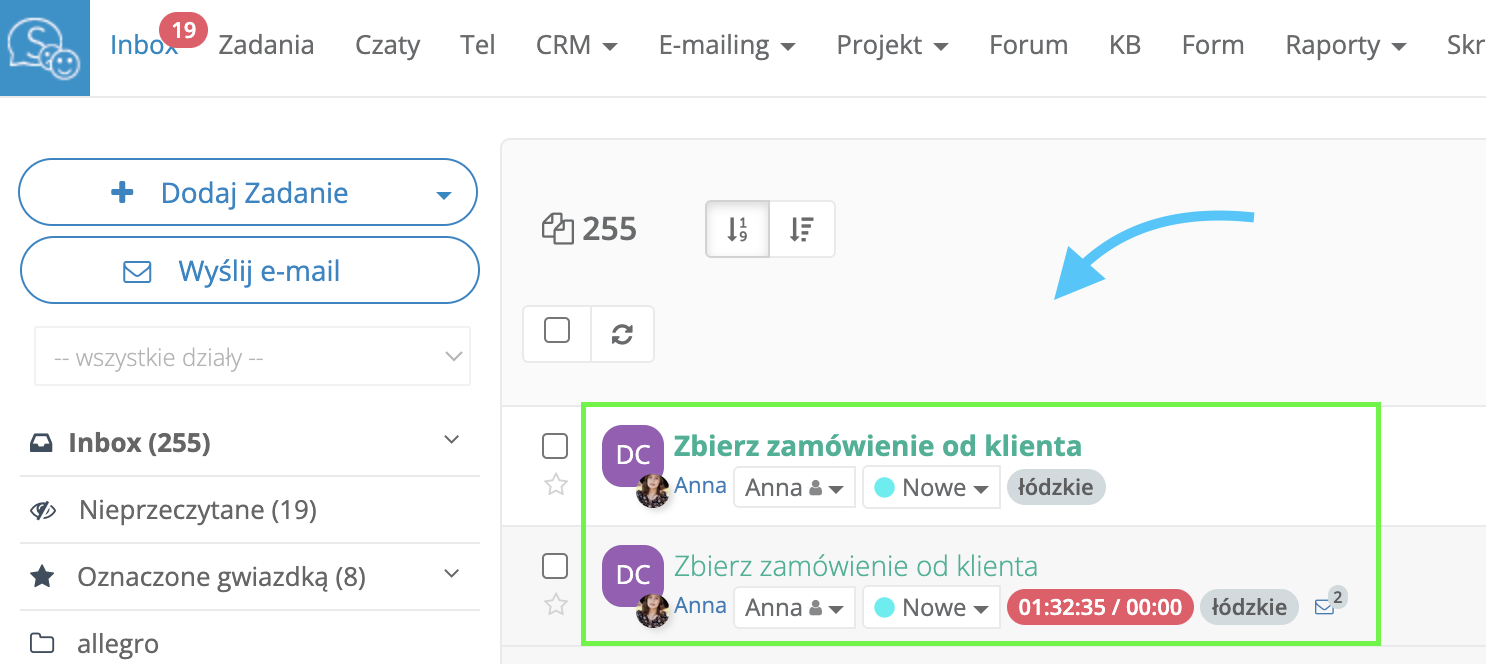
If you use VoIP and don't want to miss any contact, create a macro that automatically adds a task about a missed call with the saved phone number to your inbox. You'll then be able to call that contact back right away.