



Customer Segmentation - Who is Your Ideal Customer?
What is customer segmentation and why is it so important?
Customer segmentation is nothing more than dividing the database of current and potential customers into groups according to specific criteria. Thanks to it, companies find it easier to determine what their customers might be interested in, customers receive a personalized offer tailored to their needs, sellers have a better chance of closing sales, and marketing departments can create an effective campaign for the appropriate target group.
What is customer segmentation used for?
Thanks to segmentation, you can determine who your customers are, what products/services they are looking for, what their needs are, and finally, you can distinguish one customer from another - this is important, as every customer is different.
Before you introduce a new product to the market, launch a new offer, or start a marketing campaign, it is worth knowing who your customer is, what their needs are, and what they expect.
So who is your ideal customer? Consider a few things that will help you determine this:
-
Does acquiring this customer mean a one-time order for me or ongoing cooperation?
-
Will the customer buy one product/service from me, or will they be interested in other services as well?
-
What is this customer's sales history in my company?
What are the types of customer segmentation?
Before you start segmenting your customer database, it is worth considering how you want to do it. Customer segmentation looks different for the B2C sector and different for B2B.
B2C Customer Segmentation
-
Demographic segmentation - allows dividing customers by age, gender, ethnic group, marital status, education, occupation, etc.
-
Geographic segmentation - divides customers based on location (country, city, province, region, etc.)
-
Psychographic segmentation - divides customers based on their shared values, beliefs, interests, lifestyle, etc.
-
Behavioral segmentation - divides customers into groups depending on how they interact with the brand - shopping habits, benefit-seeking, loyalty level, etc.
B2B Customer Segmentation
-
Priority segmentation - divides customers by industry and size
-
Needs-based segmentation - based on specific needs expressed by customers regarding a particular product or service offered. Needs are identified based on market research
-
Value-based segmentation - distinguishes customers based on their economic value, grouping them by the same level of value
Look at the specifics of your business and your current customers - who they are and what they need. Then it will be easier for you to determine the characteristics by which you will describe/group them.
It is important that the group is not too general, as you will lose too much time and energy convincing potential customers of your offer. The more you know about the customer's characteristics, the easier it will be to assign them to the appropriate group. If, for example, you operate locally, companies from the same region or province will have much greater potential for you, whereas if you provide software and the fee depends on the number of users, companies with, for example, 20 employees or more will be more valuable to you.
Why is it worth segmenting customers?
Without understanding how your customers are segmented, you will not be able to accurately manage either the capital allocated to acquiring new customers or the team that is supposed to acquire these customers.
If, however, you correctly group your customers, you significantly increase your chances of:
-
product development - understanding who your customers are and what they need will allow you to introduce the best solutions that your customers are looking for. This will make them more loyal to your brand, and you will stand out from the competition. All information about your best customers will allow you to provide better customer service, professional services, and a tailored offer, which make up the entire customer experience with the product
-
effective marketing campaigns - customer segmentation will help you develop more targeted marketing messages that are tailored to each of your best segments. This gives you a chance for higher quality interest in your product
-
achieving greater sales by the sales team - By spending less time on less valuable opportunities and more on the best segments, your sales team will be able to increase the win rate, expand reach, and ultimately increase revenue.
-
higher revenues - Not all dollars are equal. What does that mean? That selling to the wrong segment can be more expensive both as the sales process itself and then maintaining such a customer. It can also have a higher churn rate or lower upsell potential after the first purchase. Focusing on more valuable customers will increase your margins and ensure the stability of your customer base.
4 steps to customer segmentation in Sugester
Customer segmentation should be one of the first things you configure in the CRM system. Correctly defining customer groups will help you understand which customers you are working with and positively impact the work of the sales and marketing departments in your company.
Before you start dividing the customer database in your CRM in Sugester, make sure that:
-
Your customer database is up to date,
-
it is filled with correct data.
If you have already completed this step, you can proceed to customer segmentation.
Since every business has its own specifics, in Sugester you can use several different options for customer segmentation.
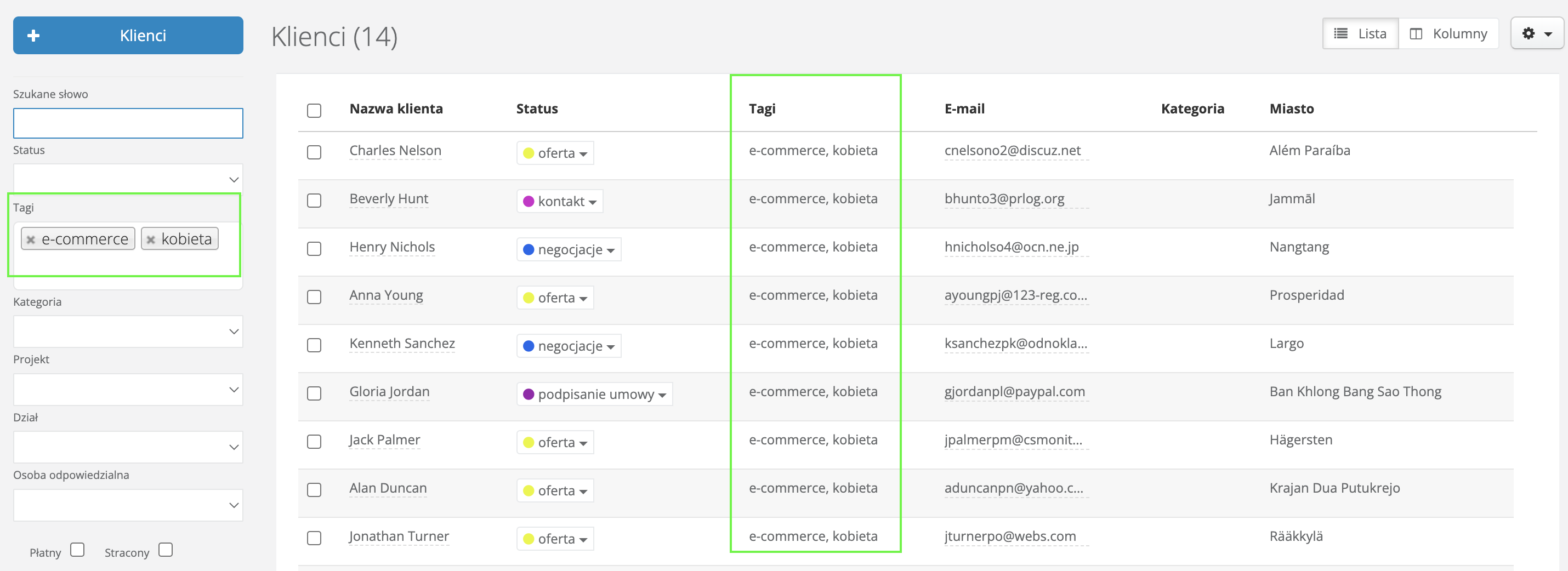
1. Tagging customers
This is probably the most commonly practiced way of segmenting the customer database in Sugester. You can easily add them to a customer at any time; there can be many, although we recommend a specific number to maintain order in the database. Additionally, thanks to tags, you can quickly find important information about the customer and create a mailing list based on them.
Tags in Sugester can be used for:
-
saving customer locations, e.g., Mazowieckie, UK, Europe,
-
determining the source of acquisition, e.g., trade fairs, promotion, recommendation, etc.
-
saving age group, gender
-
grouping customers by company size, e.g., up to 50, up to 100
-
saving the service/product the customer uses
-
saving information on how to contact the customer, e.g., email, phone.

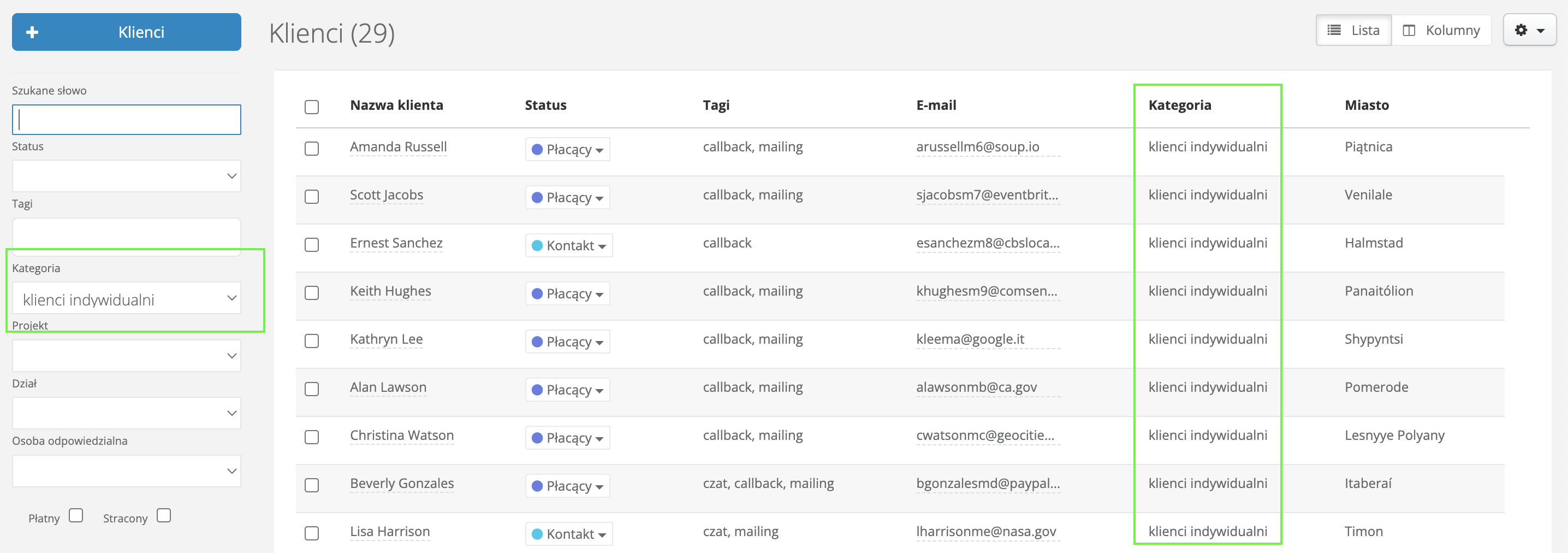
2. Dividing customers into categories
In Sugester, you can also divide your customer database using categories. Categories can be used if you want to group your customers, for example, based on:
-
location - you can group customers from one province
-
industry - you can specify the industry in which the customer operates
-
type of customer - you can specify whether it is a customer, supplier, partner, contractor, etc.
See also: Tags in the CRM system - how to use them?
3. Determining customer status
Customer statuses in Sugester are very important. They allow you to determine at what stage of cooperation with the customer you are - whether you are negotiating, sending an offer, or perhaps making a sale.
You determine the statuses yourself in the configuration of your account. Depending on the specifics of your industry, you can add statuses to customers that will appropriately describe each process, e.g.:
-
contact-offer-negotiations-sale
-
potential-meeting-contract signing
-
lead-potential-sent offer-realization
4. Custom fields in customers
Custom fields allow you to save personalized information about a given customer. They facilitate sorting and searching for data. Based on advanced search, you can save a customer filter that you will then use to create a mailing list.
You can use custom fields in Sugester for:
-
saving information on how to contact the customer, e.g., email, phone.
-
saving the service/product the customer uses
-
grouping customers by company size, e.g., sole proprietorship, up to 50, up to 100
We hope these few tips will help you conduct effective customer segmentation in Sugester.
This is very important because it will allow you to determine which customers are truly valuable to you and bring significant income, and which are seemingly important but actually generate small revenues and require a lot of time.
If you can sell more products to your most profitable customers, you will be able to scale your business more efficiently and be confident that everything you do—from lead generation to developing new products—is heading in the right direction.