
Implementing VoIP telephony lets you take control of phone handling in your company, reduce costs, and expand your reach. With it, we have full visibility into calls, we know which clients are calling, what they're talking about, and for how long. We can also easily track call statistics and monitor the support team's work.
In this post, you'll learn what VoIP telephony is, how the VoIP module in Sugester works, what its CRM integration involves, and how to connect it all so you can once and for all solve the problem of missed calls, inefficient conversations, forgotten contacts, and confused employees.
Let's look at a specific situation.
Say you have a small gardening company that sells plant growing products. You have one employee (and are about to hire a second) whose job is to stay in touch with your clients, maintain good relationships, and collect orders and schedule deliveries. Your employee uses a single mobile number.
Your problem is that you have absolutely no control over outgoing calls in your company. You don't know how many calls your employee makes per day. Are they all business calls? You also don't know which clients they're contacting or what's been agreed upon. The only thing you're left with is a bill at the end of the month.
How much money are you losing this way? How many orders will never be fulfilled? How many potential clients are you losing because of missed calls?
If you're wondering how to solve this or a similar problem, the answer is simple - just implement VoIP telephony in your business.
Try the VoIP module in Sugester
VoIP (Voice over Internet Protocol) is a technology that allows voice to be transmitted in digital form over the internet. VoIP uses the internet network for voice calls instead of traditional phone lines. This means you can connect with a caller from anywhere in the world using a computer, smartphone, tablet, or IP phone.
It works roughly like this: during a call, your voice is digitized and converted into a data packet. That data packet is then sent over the internet to the recipient - your caller. At the recipient's end, the data is converted back into an analog signal, allowing the caller to hear your voice.
Here are the main reasons why it's worth implementing VoIP technology in your business:
1. Cost reduction
This is probably the main benefit that should convince you right away. By using the internet to handle business calls, you eliminate costs associated with traditional phone networks. This is significant savings, especially if you make international calls.
2. Flexibility and availability
VoIP lets you scale your company's phone network up or down at any time, depending on its size and current needs. You can start with a single number and add more as your business grows.
3. Mobility
VoIP lets you make and receive calls from anywhere in the world - all you need is internet access. This greatly facilitates contact with business partners and clients worldwide, even if you work in the field.
4. High call quality
VoIP calls deliver quality comparable to traditional phone calls.
5. Easy management
Activating and configuring VoIP is simple and requires no technical background. Just follow the VoIP provider's instructions to get the service up and running and customize it to your company's needs.
6. Integration with other systems
VoIP can easily be integrated with other systems such as CRM, which improves customer service, streamlines the flow of information, and helps you prepare offers that perfectly meet client expectations.
You'll pay less for VoIP than with traditional telecom operators. Especially for international calls - the rates are significantly lower there.
You also avoid costs related to purchasing additional hardware, connecting phones to the network, and maintaining the entire infrastructure. Just install one of the popular softphones (Zoiper, Bria) on your smartphone or computer and you can start calling right away.

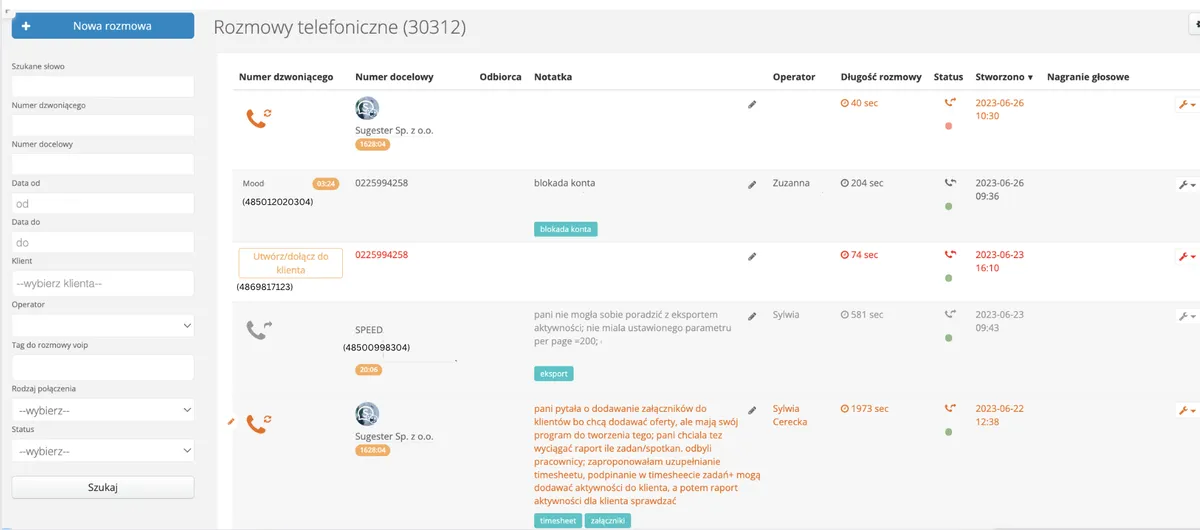
As a Sugester account holder, you can activate the VoIP module at any time for free. It registers and displays every outgoing and incoming call along with the most important information about that call - phone number, client name, date and time of the call, call duration, and the Sugester username of the person who made/received the call.
If you want to use the VoIP module in Sugester, all you need to do is set up an account with the VoIP operator we're integrated with - Telecube - and then activate the phone call module in Sugester itself.
Why do you need an active Telecube account? Because it's a necessary condition for using VoIP in Sugester.
What does your Telecube account allow you to do? You can add numbers, set up voice messages, manage queues, and listen to calls. Every call is passed from Telecube to us - to Sugester. This allows us to display a list of all calls in your company - both outgoing and incoming, from various numbers.
Thanks to the integration of the VoIP module with CRM, every client conversation is saved in the CRM. This enables seamless communication regardless of who in the company picks up the phone and when the caller last reached out. Even if a client hasn't been in touch for a year and the person who used to handle them no longer works there, any other employee can look at the client card and the note from the last call and continue servicing that client without much effort.
Now see how the VoIP module in Sugester can help you take control of calls in your company, boost your employees' productivity, and work on better sales.
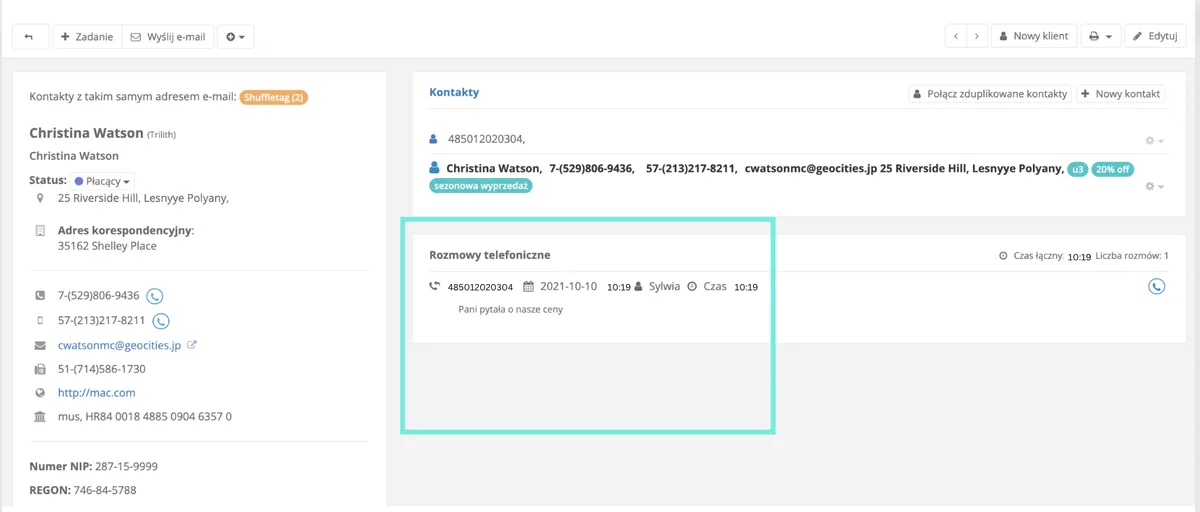
Make every call from a number connected to VoIP. This way you build a list of all calls in Sugester that you can then monitor. Additionally, every conversation is saved on the client card in the CRM. This will allow your employees to find all calls with a specific client at any time, check when the last contact was, and know when they should reach out again to collect an order.
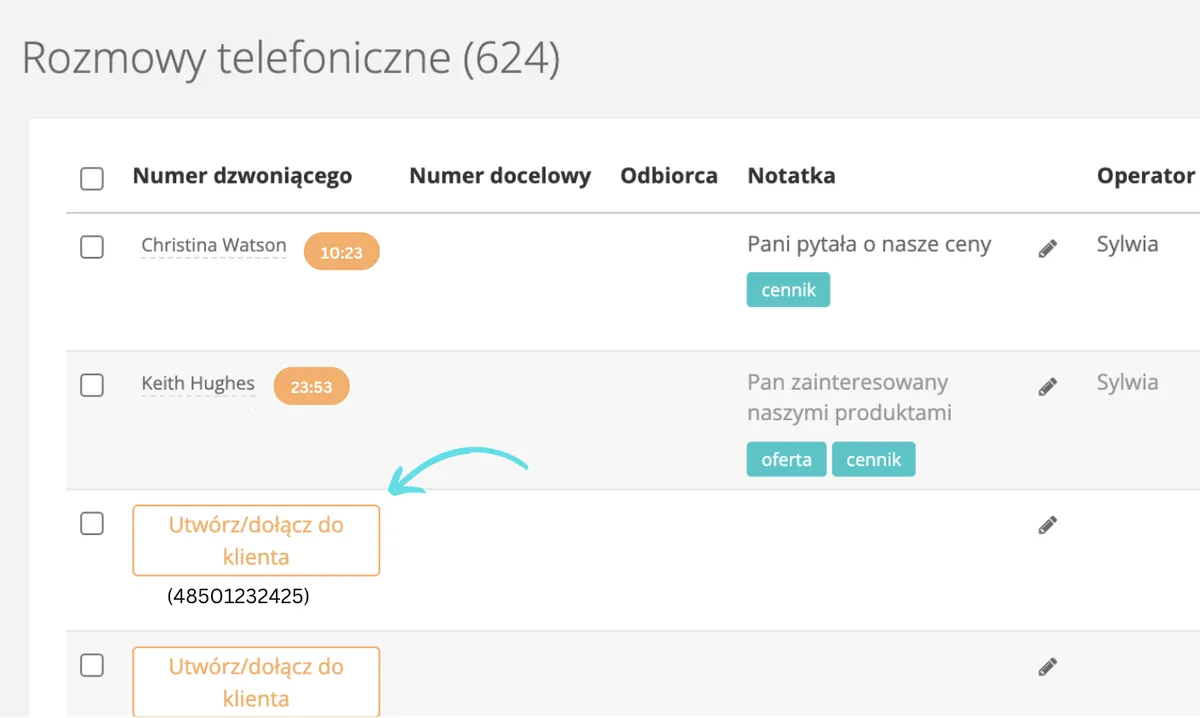
Every number you call or that calls you should be saved in the CRM. If you're calling a regular client but on a different number than usual - add it as an additional contact. This way the call will be saved on their card in the Phone Calls section, and you'll build a contact network so that next time you know to call number x for order matters and number y for invoice corrections.
Do the same with every new number that calls you. You never know when a potential client will become a regular buyer. This way you'll keep your existing clients' phone numbers organized, increase your chances of sales by collecting leads from potential clients, and improve service quality.
Even if someone other than usual calls a given client, they'll see when and what the last conversation was about, allowing them to prepare for it professionally.
How to create a new contact or add a new number to an existing client?

This isn't mandatory, but it significantly streamlines further communication with the client - especially if you know your team will grow in the future. For call tagging to make sense, use consistent tags and carefully choose your keywords. This will later allow you to more efficiently find calls on the same topic.
Example
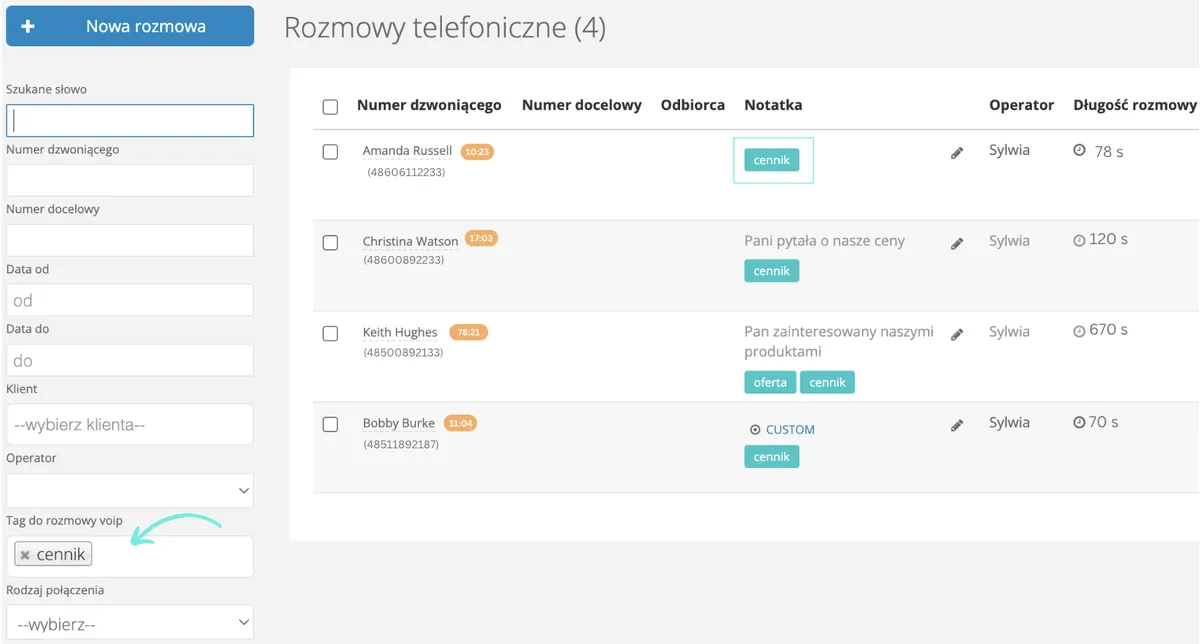
You can tag all new numbers with "potential" and set a reminder in Sugester for when to reach out to them. Clients ordering specific products can be tagged with those product names, e.g. fertilizer, seeds, etc. That way, if you're planning a promotional campaign, you can search the call list for all calls tagged with e.g. "seeds" and call them to let them know about the promotional price.
You can also simply use tags to mark the topic of the conversation. This way, at the end of the month, you can easily see how many calls were about a specific subject, assess which topics are more popular, and identify current trends among your clients.
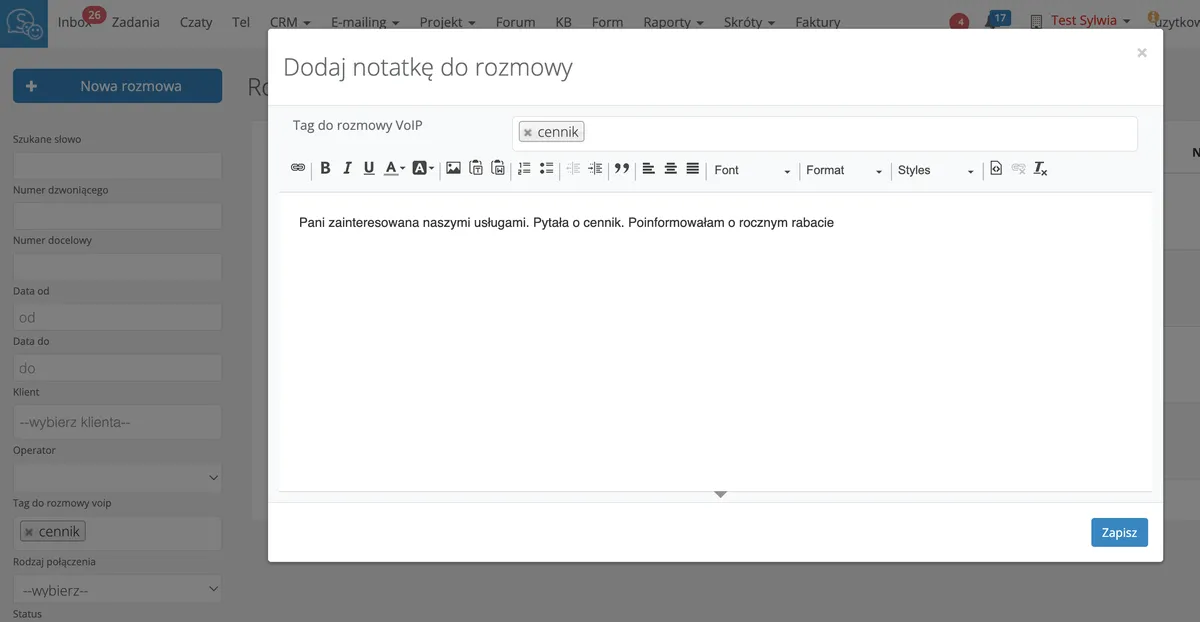
The best time to add a tag is during the call or right after. Just click the pencil icon next to the client's phone number in the VoIP list and type the appropriate phrase in the Call tag field. Clicking this field lets you choose from your system-suggested tags or add a brand new one.
During or right after the call, it's worth adding a short description of what the call was about in the form of a note. If the client isn't currently interested in placing an order, you can use the note to record why and set a reminder for a follow-up, after agreeing on it with the client. Or to note unusual delivery times.
In general, the note should contain all the most important information from the call that will make it easier to service that client in the future and help recall key agreements.
By adding tasks directly to a call, you can create a task during the call itself and record the order details in it. In such a task, you can note the order fulfillment date and immediately assign it to the person responsible for filling it.
Thanks to task statuses and notifications, the employee who took the order from the client will be informed when it's been fulfilled. This will be the signal for further steps - delivering the products to the client.
Every task created this way is of course visible on the relevant client's card - all thanks to the integration of the VoIP and CRM modules. When you click Add task to call from the VoIP view, the system automatically fills in the client's name in the Client field of the task.
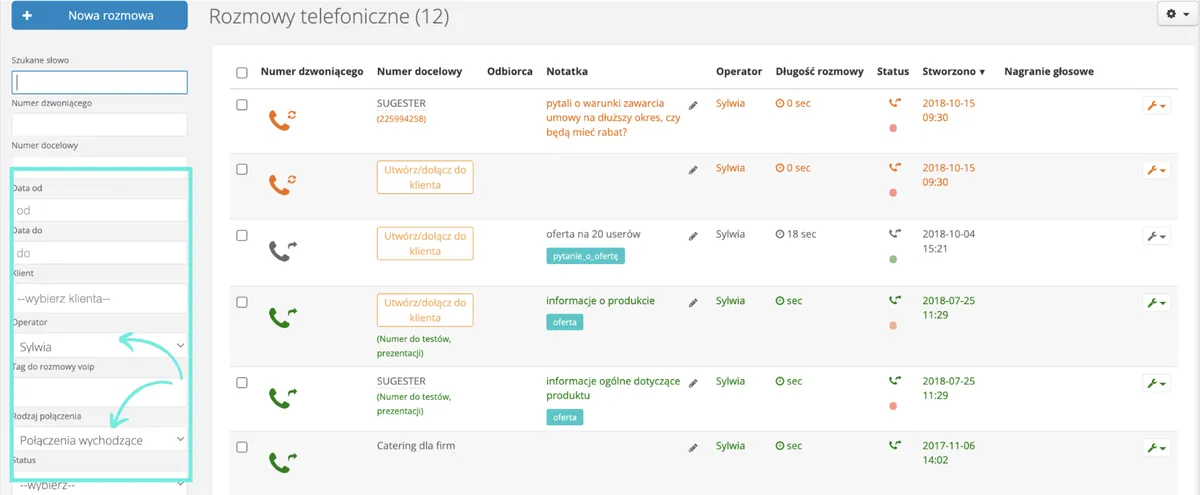
Since you're using the VoIP module and all calls are saved in the system, you have access to them at any time. The call list includes a simple search tool. With it, you can check how many outgoing and incoming calls were made on any given day/week/month or in any custom time range.
You can also easily check - if more than one person handles phones in the company - who handled how many calls. You can also sort calls from longest to shortest, giving you insight into which topics are more time-consuming and what might be done to shorten them.
You can also clearly see which numbers were called. You can check how long each call lasted - if most are very short, that might make you wonder. Having these statistics on hand makes it easier to draw certain conclusions.
With the VoIP module integrated with both CRM and the mailbox in Sugester, you have complete information about your client. You can see what issues they contact you about, how often they buy from you, and what problems they report. You also know who handles them and when the next contact is scheduled. This way, all important client information is organized - you build a purchase history for each client and give your employees comprehensive data about their preferences and needs.
This enables full personalization of the offer and a client-centric approach. And most importantly - regardless of who answers the phone at any given moment, they can quickly check in the CRM what the latest agreements with that client were, when and what the client ordered, and what to offer them next.
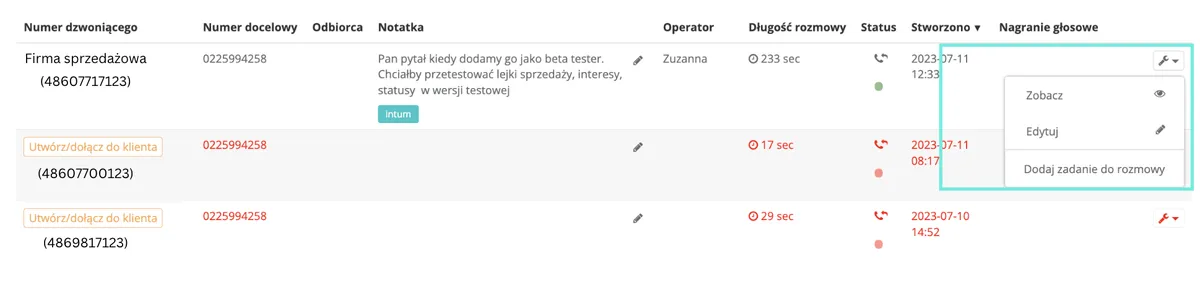
To make the most of VoIP's potential, you can activate automatic notifications for missed calls in Sugester. How does it work? With the help of our instructions, you add a macro to your account that will cause Sugester to create a task with that phone number and place it in the To Assign folder in the inbox every time a call is missed. This way, the employee handling phones will see the task and can return the call when free. This will certainly reduce the percentage of missed calls in your company and increase the chance of additional sales.
Sugester will also help you make sure every new client in your CRM gets called. This is all thanks to another simple macro you can set up on your account.
If you want to, for example, contact a new client 14 days after they made a purchase, Sugester will automatically fill in the custom field with a date 14 days later, counting from the day the client was created in the system. You don't need to fill in this information manually. What's more, you can easily display a list of contacts to call on a given day using the client search.
Recurring tasks are used to record and remind you of repetitive activities that need to be done.
By using recurring tasks in VoIP, you're able to satisfy the needs of 3 parties:
So create recurring tasks for your employees related to contacting specific clients.
For example, if one of your clients places regular orders with you - monthly, quarterly, semi-annually - you can set up a recurring task for that client, e.g. "Call client about order." The task will appear in the designated employee's inbox at the set time.
In Telecube, you can prepare a message that clients will hear when they dial your number. You can use messages to:
Telecube provides an accessible guide on how to prepare such a message.
Every visitor to your website is a potential client. The more contact channels you offer them, the greater the chance they'll reach out.
If you want to increase the number of calls your company receives - and thereby increase your chances of acquiring clients and making sales - activate the callback widget feature in Sugester.
Here's how to do it:
And you get this widget on your website
With it, you open up new possibilities. A client interested in your products can leave their number for you to call back. You don't have to do anything - the system handles it all.
At the scheduled time, Sugester automatically initiates a call to the selected number. If the client doesn't answer, the system will retry after a while. A big advantage is that the client can request a conversation at a time convenient for them - not necessarily the moment they're entering their number in the form.
And you collect potential contacts even outside of business hours. Who knows how many new clients you might gain this way?
Now that you know all the benefits of implementing VoIP technology in your company and how valuable the VoIP module in Sugester is when integrated with CRM, plan the changes for your business. If you're using several numbers, we recommend starting with one to make it easier to familiarize yourself with how the feature works. Also remember to train your employees. Using VoIP in Sugester is really straightforward, but it's worth holding an introductory meeting for people who will be working with it.
Finally, here is a list of frequently asked questions about VoIP and their answers. They may prove inspiring.
1. What do you need for VoIP?
For VoIP, a PC or laptop is sufficient. You need a broadband connection and the right software - a softphone. Your computer should also have a microphone and speaker.
2. How do you connect a regular phone to VoIP?
Telecube describes hardware configuration for the most popular phone brands and apps at this link.
3. What VoIP apps are available?
There are many paid and free solutions available on the market for handling VoIP calls. At Sugester, we currently use the Bria app. You might also consider Zoiper, Acrobits, or another available app.
Decide for yourself what best suits your needs.
4. What is an IP phone, a VoIP gateway, and a softphone?
An IP phone is a digital device that looks just like a regular phone and is already set up to work with a virtual PBX. If a company already has an IP phone that supports SIP accounts, it can be used with TeleCube. If such a purchase is still being planned, an IP phone will provide the highest call quality.
A VoIP gateway enables the use of existing (traditional) landline phones, cordless phones to work with the TeleCube virtual PBX. A VoIP gateway converts the analog signal generated by traditional devices into a digital signal. This signal is then transmitted via the internet connection to the virtual PBX.
Each gateway has a defined number of ports. One port connects one traditional telephone handset and enables one conversation at a time.
A softphone is an application for a computer or smartphone - a virtual phone. Using appropriate software like Bria, you can make calls from your own computer or laptop using headphones with a microphone.
5. How much do calls cost in Telecube?
Check the pricing of our operator to choose the right plan for you.
6. Do I have to give up my current number?
No, you can transfer both your landline and mobile number to Telecube.
