Have you ever wondered whether the data in your company is safe? Running a business means operating with a large amount of information every day - email addresses, contacts, names, transaction records. How efficiently and effectively you protect your company data affects not only your relationships with customers but also your business future.
More and more businesses are moving online. And more and more, we hear about phishing, hacking attacks, and data breaches. To protect against data loss, an increasing number of companies are investing in CRM systems - tools that not only gather and analyze customer data, but also protect it.
In today's article, we will review the best practices for maintaining data security in CRM systems. Check out the most effective strategies worth implementing.
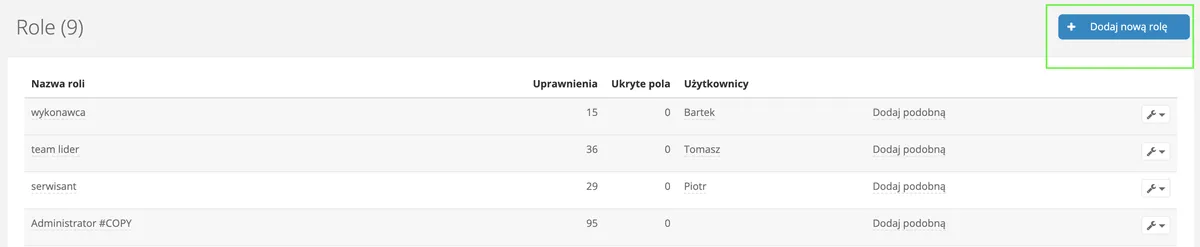
Access control is one of the basic measures to secure your data in a CRM system. Depending on the role an employee plays in your company, you should provide them with access to the data appropriate to their position, so they can effectively carry out their duties.
When creating the appropriate role for your employee, you decide what information they can see in the system.
In Sugester, you can assign users permissions depending on their level of responsibility and position in the company. A salesperson should have access to different data than the accounting department. Using the advanced Roles feature, you can precisely define not only access to selected modules, but even individual options within a module. For example, you can set that every salesperson in your company can only access their own customers, edit them, but cannot delete them or view financial data.
The system will also check permissions when attempting to export data. If a person without the appropriate permissions tries to do so, the export will not be possible.
Roles are flexible enough that you can change the permission level for your employees at any time, for example if structural changes occur in your team.

Double login is an additional layer of security for your account. It is especially practiced in the online environment and when accessing accounts that contain important information or personal data.
Two-step authentication requires the user to confirm their identity each time by entering a password and an additional code, which is sent via SMS or email.
By using two-step login to your CRM system, you protect your data from hacking attacks and ensure privacy. Even if your password is stolen or falls into the wrong hands, account access will be protected by the second authentication factor.
In Sugester, we have taken care of this security level, so you can activate the double login process for each of your users.
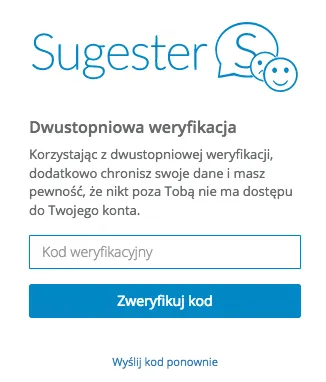
Once this feature is activated, the login process will be as follows:
* enter your username and password in the login window
* after clicking Log in, a window will appear informing you that two-step verification is active. An email with a verification code will be sent to your address - enter this code in the Verification code field.
Most CRM systems protect against data loss through data backup. However, nothing stops companies using CRM systems from independently creating their own data backups.
In Sugester, all information stored in the system is backed up daily. We store backups on Amazon AWS servers within the European Economic Area. In the event of accidental data deletion, we can restore a backup of your account's database upon your request.
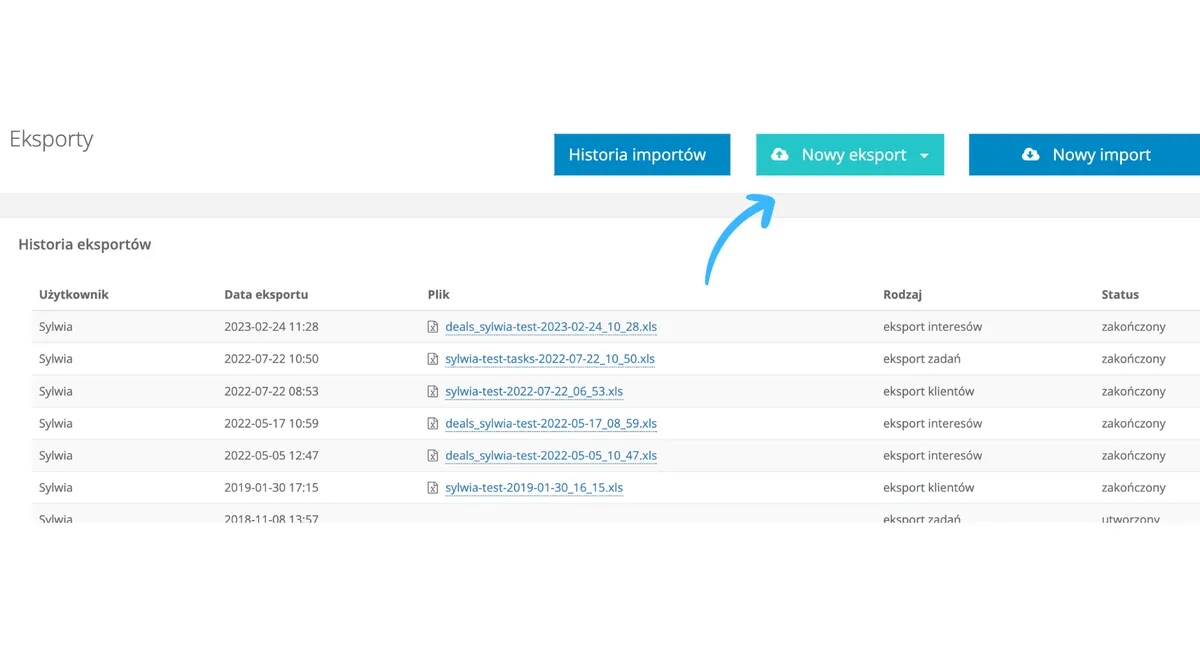
In our system, you can also independently create your own backup of emails, tasks, customers, deals, and knowledge base posts. Simply use the data export function. Emails are exported to eml files, while customers, tasks, deals, and knowledge base posts are exported to xls.
This way you create your own backup that you can always use in a situation where, for example, one of your employees accidentally deletes several important customers. Having your own backup, you can quickly import the previously exported file and restore the customer list to its state before the unfortunate event. To avoid duplicating imported data, simply use the Duplicate strategy option when uploading. The system will then only reload records that are not already on the list. Problem with deleted customers solved!
Verifying a user's email address is an additional layer of security that helps verify the user's identity and protect against phishing attacks.
Therefore, when using our system, you should first verify your email address and ask your employees to do the same.
Verification will also help you safely and easily recover your password and will enable - for fuller protection - activating double login for each user.
Restricting account access to specific IP addresses is an additional level of data protection offered by Sugester. This practice enhances security and protects against unauthorized access to your account.
Restricting login to specific IPs reduces the risk of hacking attacks and phishing.
If you want to ensure that no one other than yourself has access to data in the system outside working hours without your explicit permission, use the feature for logging in only from specific IP addresses.
This way, as the owner, you can specify the IP addresses from which your employees can access Sugester. This can be the office IP or the employee's home IP address. This prevents unauthorized actions on client data outside work hours or unauthorized login attempts.
You can check your IP address by typing "what is my ip" in Google search.
A good practice for data security, regardless of the system you use, is to change your password regularly. This helps minimize the risk of unauthorized access to the account. Over time, old passwords become more vulnerable to hacking attacks, so regular updates are just as important as initially setting a strong password.
In Sugester, you change your password in the user profile editor.
When changing the password, the system first asks you to enter the current one, and then to set a new password.
In Sugester, you have the option to connect your account to your own domain.
What does this mean? That when logging into your account, instead of the example address your-company.sugester.pl, users will see crm.your-company.pl in the address bar.
In this case, communication between the user and the site - apart from the login process - takes place by default using the HTTP protocol.
What does this mean for you as a user? That your communication is not encrypted, and therefore less secure. That is why it is so important to remember to use the encrypted version of the HTTP protocol, i.e. HTTPS. When encrypting connections, keys such as SSL are first exchanged, and then the http:// request is transmitted. Such encryption protects against interception or modification of transmitted data and ensures the authenticity of the source page.
So if you decide to use Sugester with your own domain, prepare well:
* configure the correct settings on your Sugester account and on your domain (follow the instructions on how to do this)
* obtain a security certificate from a trusted certification authority and send it to us
* wait for our confirmation that the certificate has been uploaded, Sugester is running on your custom domain, and communication is taking place via HTTPS
Remember to always keep the certificate up to date.
And what about users who do not use the Sugester custom domain option? They do not need to do anything, because every account at *.sugester.pl by default has an HTTPS connection, meaning the transmitted data is encrypted.
Protecting customer data should become a key element of building trust and lasting relationships for all businesses. CRM systems equipped with data encryption, precise permission management, a double login process, or the ability to perform regular data backups are the essential tools for securing the most important data that customers entrust to us.
Remember, however, that data security is not only a matter of technology, but also of the awareness and commitment of every system user. Secure practices, conscious use of security features, and ongoing training are the pillars on which a solid data protection structure rests.
